
The HDF5 file is used to store the output data generated by the ThermoCorr DIC-2D program. The file is organized hierarchically to efficiently manage data from multiple analyses. The DIC analysis serves as the base dataset, and in subsequent steps, additional data from external analyses can be added, for example, results from coupled thermal analyses.
The first main group is images. This group contains a subgroup
named dsp, which stores images acquired by the camera operating
in the visible range. These images are used as the basis for the DIC
analysis and correspond to the frames analyzed during processing.
Although a larger number of images may be recorded during an experiment, only those images actually used in the DIC analysis are stored in the file. The primary purpose of these images is to provide a background reference when visualizing the output data.
The second main group is output, which contains several
subgroups corresponding to different physical quantities computed by the
DIC analysis. For example, the u subgroup stores displacement
data. Within this subgroup, individual datasets contain the computed
displacement fields for each analyzed frame.
The same structure is used for other quantities, such as temperature
(T), displacement gradients (H), and additional
derived fields. Each subgroup contains frame-wise datasets of the
corresponding results, ensuring a consistent and organized data layout.
The third main group is region, which contains the definition
of the DIC measurement points. The dataset storing this information is
called nodes and is an n x 3 matrix, where n is
the number of DIC points.
This group defines the spatial layout and validity of the points used in the DIC analysis.
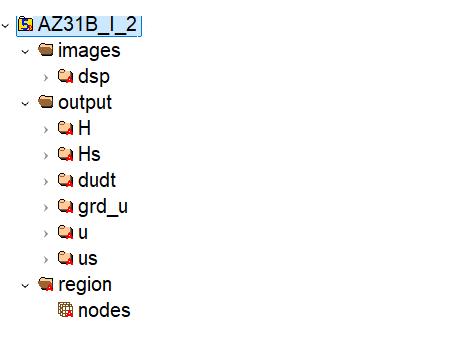
The following screenshot shows a typical view of the ThermoCorr HDF5 file as displayed in an HDF5 viewer. It illustrates the hierarchical structure of the file, including theimages, output, and
region groups and their corresponding datasets.
Each dataset in an HDF5 file contains its own attributes.
For example, each image in the images/dsp directory has been assigned
a time attribute that stores the actual process time.
The first frame always has the time set to 0.
In the case of the displacement field, additional attributes are stored,
such as the number of components of the field and its type.
To examine the internal structure of the HDF5 file, including datasets, groups, and their associated attributes, it is recommended to use the HDFView tool provided by the HDF Group.